

Max GO
Empowering members to track and sync their habits while moving, resting, and feeling better through an easily connected unified wearable experience.
⏱︎ Read time: 3 minutes

Overview
Max GO, a new wearable was developed in response to persistent user frustrations with its predecessor, Max Buzz.
Max GO streamlines the syncing process, improves connectivity, and effortlessly supports users in achieving their health goals, making wellness tracking easier. Available to 25M members to purchase.
Details
My role:
Product Designer
Timeline:
Nov 2023 - July 2024 (launched)
Responsibilities:
End-to-end process


CHAPTER 1 - DISCOVERY
Underlying Issues of Max Buzz
Tracking daily activity should be simple, but Max Buzz (the fitness tracker previously launched years ago) made it frustrating.

STEP 1
Setting up the device
The Max Buzz does not come fully charged and requires charging via a laptop before it could be paired.

STEP 2
Charging the device
The device needs to be detached, taken apart, flipped upside down, and plugged into a laptop.

STEP 3
Ready for pairing
Once the device buzzes and wakes up from charging, you can begin pairing it through the Personify app.
The issues with onboarding
-
10+ onboarding screens = 10+ clicks
-
WCAG text contrast ratio fail
-
Heading text styles inconsistent
-
Buttons don't adhere to standard sizing guidelines for Android and iOS
-
Graphics lack inclusivity
-
Inconsistent use of design system components
-
UX writing lacks clarity and does not follow industry standard practices

Listening to Our Users
By analyzing user interviews, customer support logs, and survey data, we uncovered key patterns with how users interacted with the Max Buzz:
01
Overly Complex Onboarding
Users had to detach the device and plug it into a laptop just to begin the setup, creating unnecessary friction
02
Unstable Connectivity
Many struggled to maintain a connection between the watch and the app, often resorting to multiple pairing attempts.
03
Lack of Modern
Functionality
Users expected a more interactive watch interface, but the existing design felt outdated and unintuitive.

"I bought Max Buzz to track my steps and be rewarded of hitting my daily goals. I noticed my steps aren't syncing at all."

"My Max Buzz doesn't stay connected, when it dies I have to go through the entire pairing process, so frustrating... "
Aligning with Stakeholders
Collaborated early with cross-functional teams to align on constraints, priorities, and the JTBD roadmap before launch.
Strategic Vendor Partnership
To meet an ambitious one-year launch goal, leadership decided to partner with a third-party vendor with existing hardware instead of building in-house.
Prioritizing the User Journey
This approach saved time, engineering effort, and cost to allow product teams to focus on creating a seamless onboarding, pairing, and post-setup experience.
.png)
CHAPTER 2 - DEFINE
Setting Our North Star
After uncovering user pain points and limitations in the Discovery phase, I focused on defining what a successful pairing experience for Max GO should look like.
Our guiding design principles:
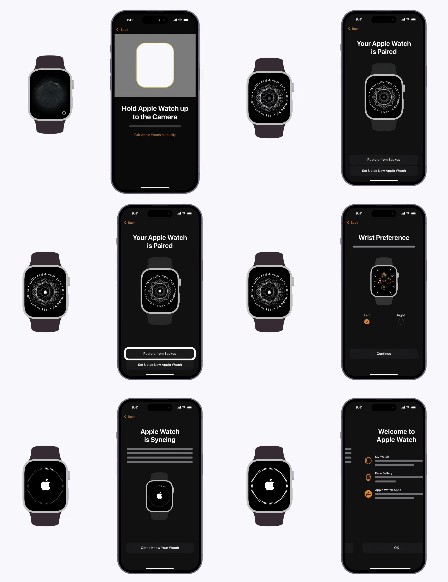
01
Simple pairing process
Users should get connected in under 30 seconds, without unnecessary steps.
Apple Watch: <1 minute | Garmin: <50s | Fitbit: <45s
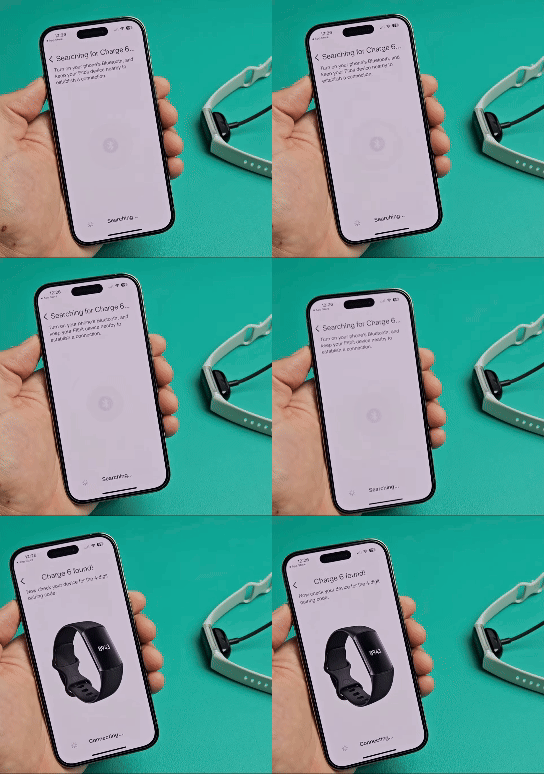
02
Animations for real-time feedback
Apple Watch: Progressive Loop | Garmin: Running | Fitbit: Rings
Introduce visuals to show when the device was pairing, reducing user confusion.
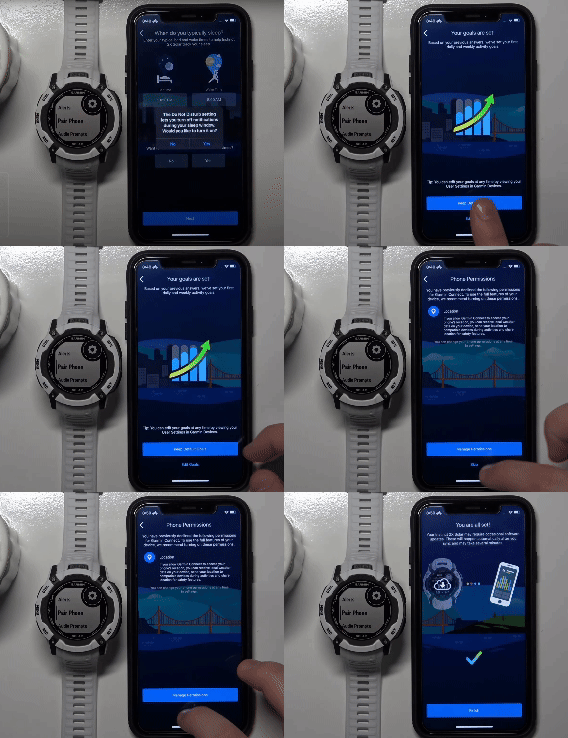
03
Enable customization options
Apple Watch, Garmin, & Fitbit: Customizable Settings Available
Allow users to personalize preferences, ensuring a more modern and user-friendly experience.
References:
|
|
CHAPTER 3 - IDEATION
Turning Insights into Flows
Outlined core features and journeys, partnering with stakeholders
to ensure feasibility and user alignment.

Mind Mapping
Defining Max GO’s Foundation
I mapped out core watch features such as alarms, notifications, call alerts, water reminders, activity tracking, etc which were determined by our third-party hardware vendor.

User Journey
Visualizing the Ideal Experience
I envisioned the best-case pairing scenario for first time users, incorporating key research insights to create a smooth and intuitive experience.

Task Flows
Designing for Every Interaction
I crafted flows for each use case, ensuring clarity and efficiency in pairing, syncing, and settings.
(this is just one snapshot of many other flows)
CHAPTER 4 - DESIGN
Bringing Ideas to Life
These lo-fi designs laid the foundation for a seamless pairing, disconnecting, settings, and device updates, allowing for rapid iteration and alignment.

Iterating Designs
I stayed in close collaboration with my PM and engineers through weekly syncs and design crits, using feedback to shape and refine the designs as they evolved.

Emily | PM

Aaron | Lead Eng

UX| Design Team

"We should include an option for users to scan the QR code on the watch to automatically sync, reducing the need for manual setup and saving time."

"We need to include height and weight inputs to the pairing flow to ensure the watch provides accurate tracking—this is a new requirement."

"Consider adding a help page within the pairing flow so users can troubleshoot connection issues without having to exit and start over."
"Utilizing a modal sheet rather than full-screen pages keeps the pairing flow quick, intuitive, and seamless without unnecessary navigation."
1st Iteration
Focused on simplifying the pairing process with fewer clicks and intuitive visuals that guide users.

2nd Iteration
Implementing QR code scanner after feedback from product manager and revising device found screen.

3rd Iteration
Due to technical constraints, the QR code scanner feature was removed. To ensure accurate tracking, new engineering requirements now mandate that users input their measurements.

CHAPTER 5 - USABILITY TESTING
Beta Testing Max GO
We launched a pilot of Max GO to 158 users to evaluate how easily they could pair their devices and gather insights to refine the experience.
Users received a Max GO device and were instructed to pair it to their account. Over a week, they tested its functionality, explored settings for usability, and practiced disconnecting and reconnecting to evaluate the pairing process.
98%
Users were able to pair the device to their account successfully.
76%
Users agreed that using Max GO felt very easy and intuitive.
80%
Users felt satisfied to very satisfied with the overall experience of Max GO.
CHAPTER 6 - LAUNCH
Introducing Max GO
Max GO successfully launched on July 2024. Available to 25M
Personify Health members to purchase.
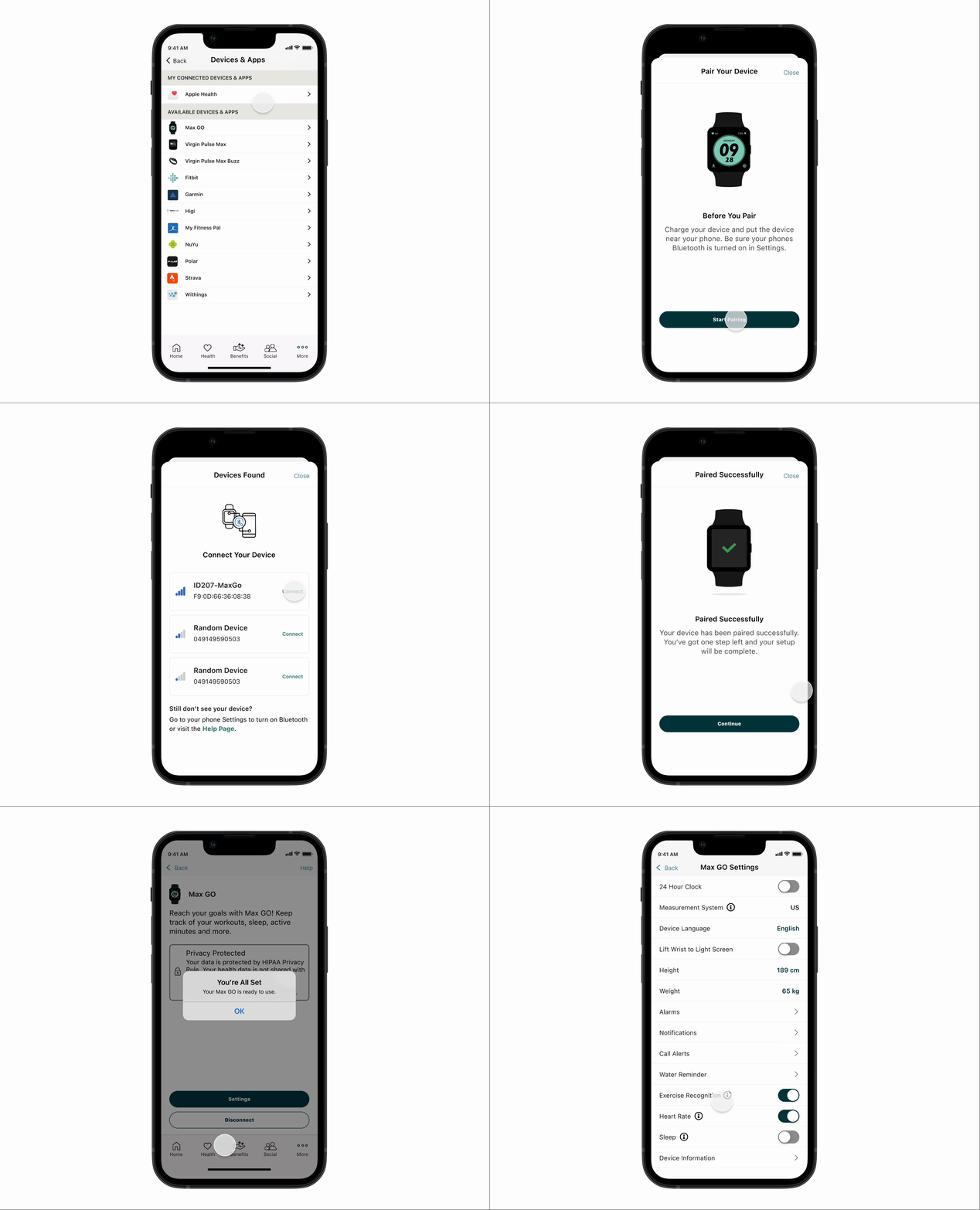
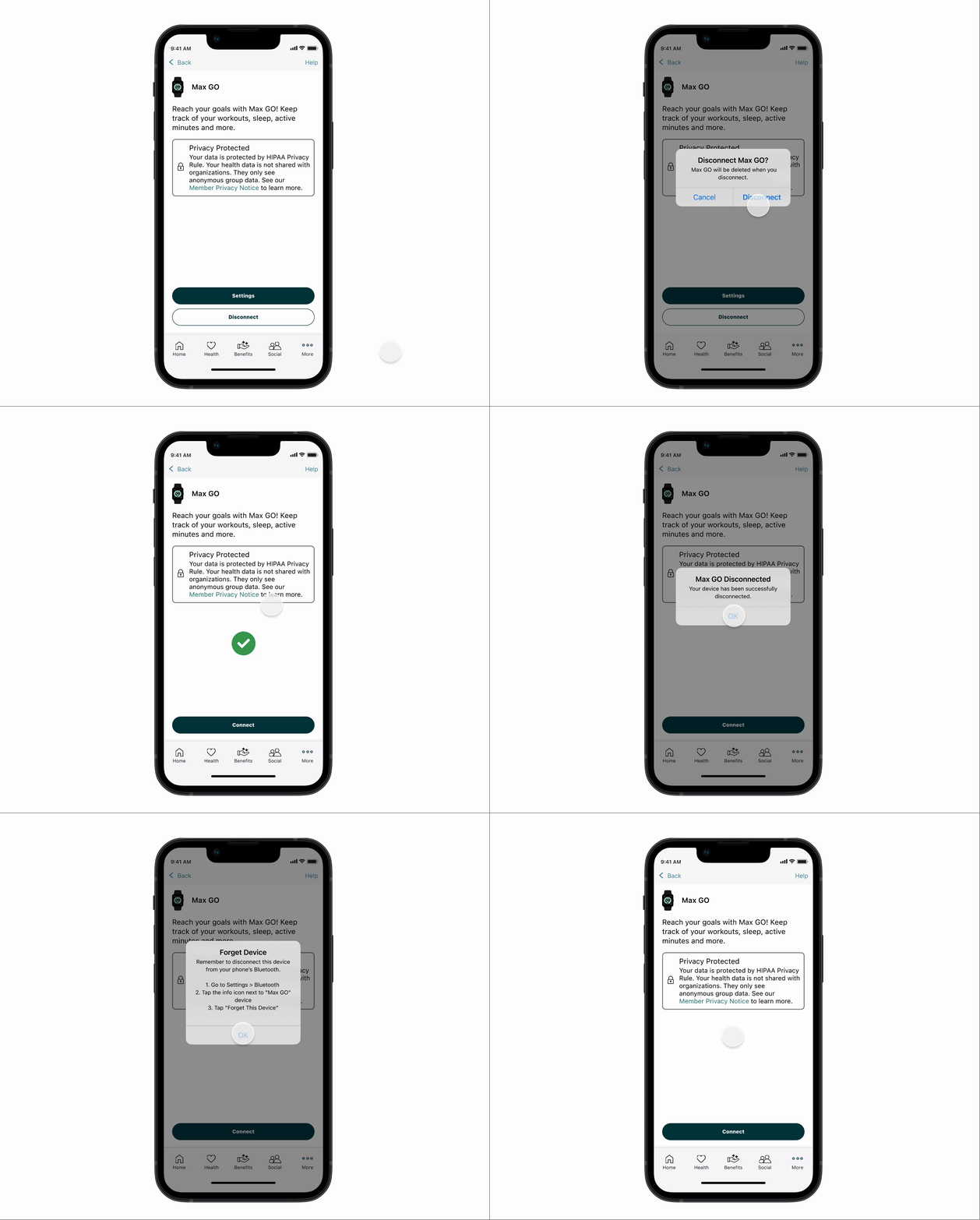
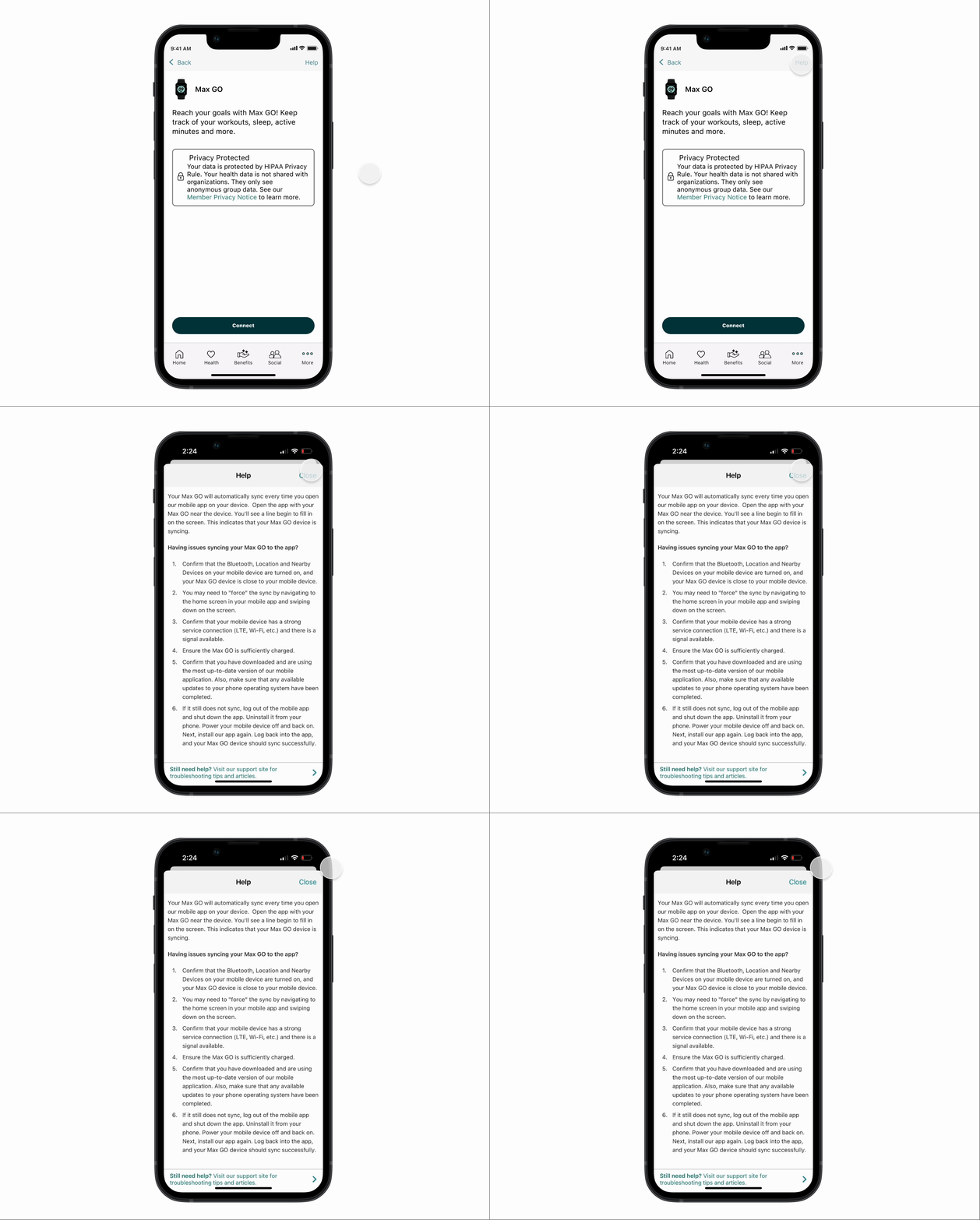
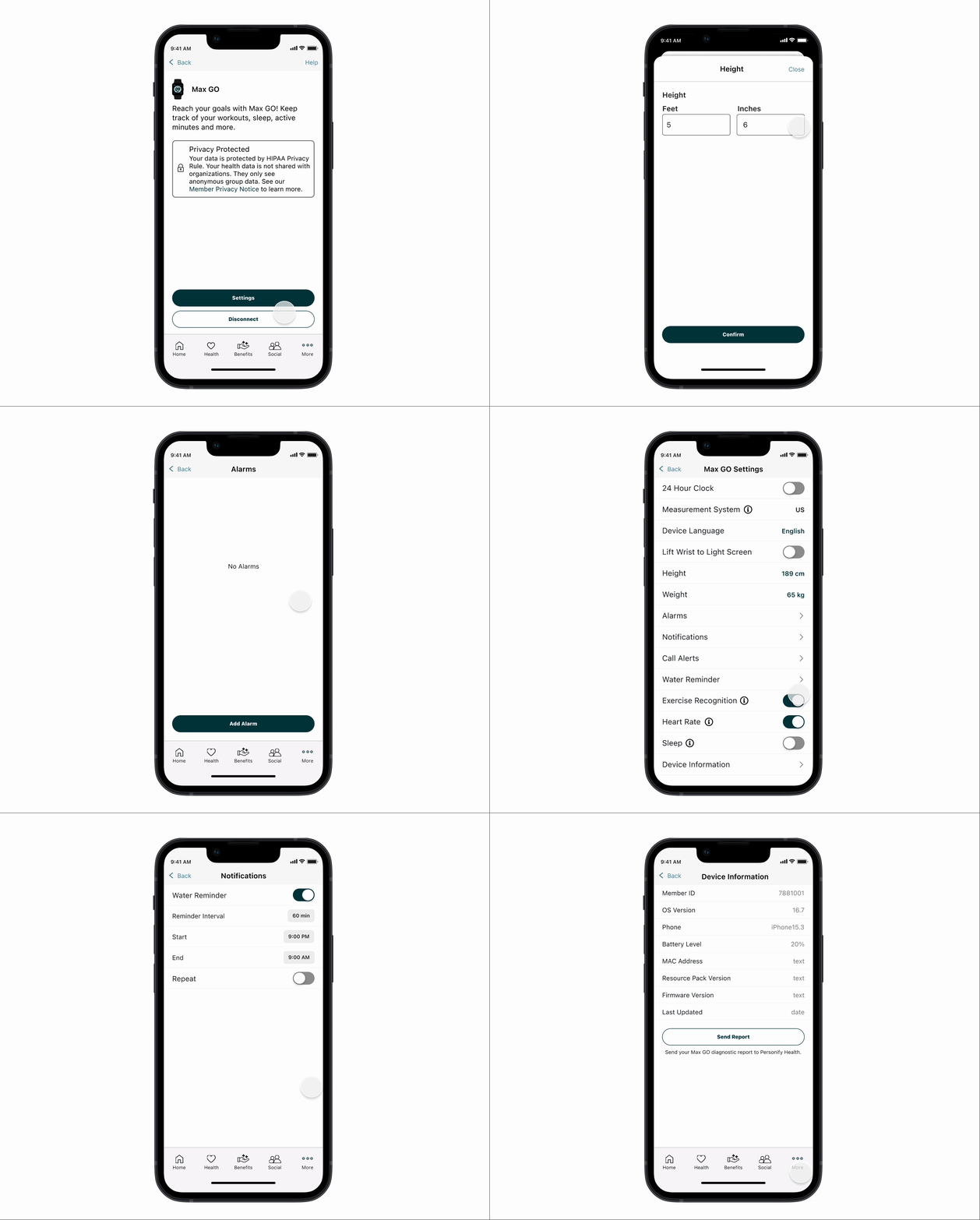
Retrospective
What I would do differently
I would revisit the visual design of the pairing icons. At the time, Personify Health’s design system was still evolving due to a company-wide rebrand, so we had limited icon options. Some of the pairing icons were hand-drawn by me, but with more time and design system maturity, I would refine them for better visual consistency and scalability.
Lessons
Working within hardware and system constraints taught me the importance of staying flexible and adapting to new requirements. Since the watch hardware UI was determined by a third-party vendor, our customization options were limited. Despite that, I learned how to focus on what we could control, like introducing motion design, adding real-time pairing feedback, and creating customizable settings to improve the overall experience.
Tradeoffs
Some of the negative feedback from testing centered on hardware elements, like the strap size or the bulkiness of the watch face, these issues were outside UX control. Balancing these external constraints while delivering a seamless digital experience required close collaboration between PMs, engineers, and designers to ensure technical feasibility.